Grant Opportunity Brief
Recently updatedBefore you invest weeks writing a proposal, get a comprehensive brief that tells you whether the opportunity is worth pursuing.
Last updated Mar 26, 2026
The most expensive question in grants
“Should we apply for this grant?” sounds like a simple question. But answering it wrong costs weeks of work. Pursue an opportunity that’s a poor fit and you’ve burned 40+ hours on a proposal that never had a chance. Skip one that was actually ideal and you’ve left funding on the table.
The Grant Opportunity Brief is how Grantable helps you answer that question before you commit. Give it an RFP or a specific grant opportunity and the AI produces a comprehensive brief — funder background, giving history, key data points, a structured decision matrix that scores your fit across every dimension that matters, and specific recommendations for how to position your application. You get everything you need to make an informed decision about where to invest your time.
This feature requires a specific grant opportunity to evaluate. It’s not for general funder discovery (that’s what /prospecting is for) — it’s for when you have an RFP or a concrete opportunity in hand and need to decide: is this worth pursuing?
What’s in a brief
The Grant Opportunity Brief is a document saved to your workspace that covers everything you need to evaluate an opportunity:
- Funder background — Who they are, what they fund, their giving history and patterns
- Key data points — Typical grant size, geographic focus, past grantees, application timeline
- Decision matrix — A structured fit score across 15 criteria in three dimensions (detailed below)
- Narrative assessment — Why this opportunity does or doesn’t fit your organization
- Positioning recommendations — How to frame your application if you decide to proceed
You can share the brief with your team, use it to brief leadership, or reference it later when you’re ready to start the application.
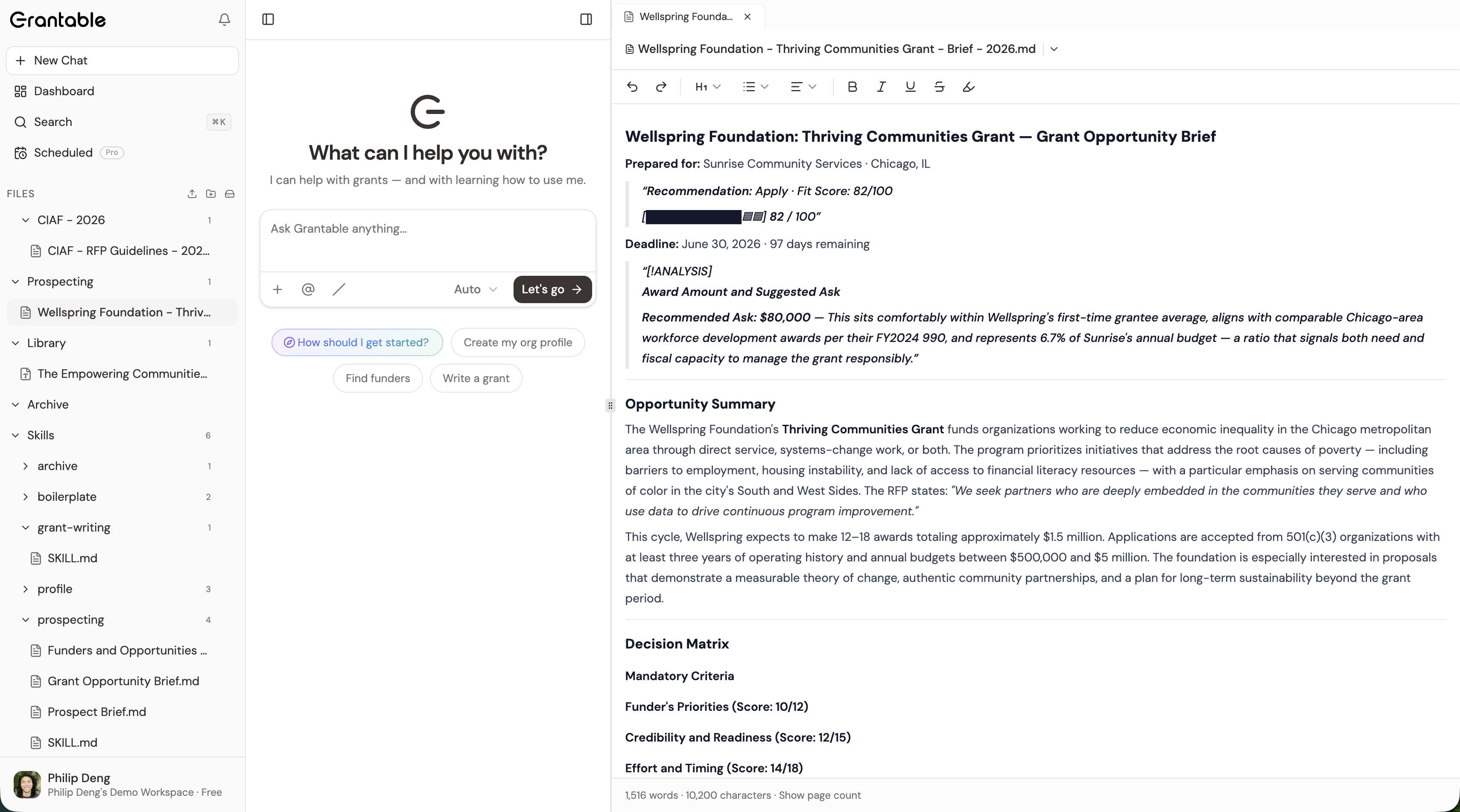
The decision matrix: three questions, scored systematically
The heart of every Grant Opportunity Brief is the decision matrix. Every experienced grant professional asks three questions before committing to an application. The decision matrix turns those intuitive questions into a structured, evidence-based evaluation.
Does this funder care about what we do?
Funder’s Priorities — Four criteria that measure alignment between your organization and what the funder wants to support:
- Geographic alignment — Does the funder give in your region?
- Areas of interest — How well do their stated priorities match your programs?
- Target population — Are they trying to reach the same people you serve?
- Type of support — Does their funding model (general operating, project-based, capacity building) fit what you need?
Each criterion is scored on a four-point scale, for a maximum of 12 points. This dimension answers: is there a fundamental match between what you do and what they fund?
Can we convince them we can deliver?
Credibility & Readiness — Five criteria that evaluate whether your organization can make a compelling case:
- Credibility with this funder — Has the funder supported similar organizations? Is there grant history?
- Subject matter expertise — Do you demonstrate deep knowledge in the relevant field?
- Fiscal expertise — Can you show strong financial management and track record?
- Project plan — How developed and realistic is what you’re proposing?
- Board and staff support — Is there governance and stakeholder alignment?
Maximum of 15 points. This dimension answers: would a reviewer believe you can execute?
Is this worth the effort right now?
Effort & Timing — Six criteria that assess whether the practical realities make sense:
- Guidelines complexity — How clear is the RFP? How difficult is the application?
- Adequate time — Do you have enough time before the deadline?
- Financial audit requirement — Is a full audit required, and is that feasible?
- Match requirement — Do you need to raise matching funds? How difficult?
- Award date — Does the grant timeline align with your project calendar?
- Evaluation complexity — How rigorous are the required evaluation methods?
Maximum of 18 points. This dimension answers: even if it’s a great fit on paper, can you realistically pull this off?
Mandatory criteria: deal-breakers first
Before scoring anything, the assessment checks mandatory pass/fail criteria — 501(c)(3) tax status, geographic eligibility, organization type, and budget range. If any of these fail, it doesn’t matter how well you score on everything else. The assessment flags the disqualifier immediately so you don’t waste time reading through scores for an opportunity you can’t pursue.
How to read the results
The decision matrix
Each criterion shows a visual score using a four-dot rating:
- Strong (3 points) — Clear, direct alignment
- Good (2 points) — Solid alignment with minor gaps
- Moderate (1 point) — Partial alignment, requires strategic framing
- Low (0 points) — Weak or no alignment
Every score includes a rationale explaining why the AI scored it that way, grounded in evidence from your organization profile, uploaded documents, and the funder’s stated criteria.
Overall fit score
The dimension scores roll up into an overall score (0–100) with a fit tier:
| Score | Tier | What it means |
|---|---|---|
| 70–100 | Strong | High alignment across most dimensions — worth pursuing |
| 50–69 | Good | Solid alignment with some gaps — promising with the right positioning |
| 30–49 | Moderate | Partial alignment — requires strategic framing to be competitive |
| 0–29 | Low | Weak alignment — likely not worth the effort |
Confidence levels
Not all scores are equally reliable. Each criterion also shows a confidence level:
- High confidence — The AI found strong, direct evidence in your materials. Trust this.
- Medium confidence — The AI inferred the answer from indirect evidence. Worth verifying yourself.
- Low confidence — Your materials didn’t contain enough information for a solid judgment. This is a signal to upload more source documents and re-run.
How to get a brief
Ask the AI to evaluate a specific opportunity. You can do this through the /prospecting skill (which produces briefs as part of its research workflow) or by asking directly in chat:
- “Create a Grant Opportunity Brief for this RFP” (with the RFP attached)
- “Evaluate whether we should apply to the Ford Foundation’s education grants”
- “How well does our organization match this opportunity?”
For the most consistent results, @ reference the Grant Opportunity Brief template in your message: “Evaluate this RFP and produce a brief following @/Skills/prospecting/Grant Opportunity Brief.md.” This tells the AI to follow the exact template format rather than improvising the structure. See @ Mentions & References for more on this technique.
The AI produces the full brief and saves it as a file in your workspace — typically in your /Prospecting/ folder.
Getting better results
The assessment is only as good as the evidence it has to work with. A few things make a significant difference:
Build your organization profile first. Use /profile to create a thorough profile before running assessments. The more the AI knows about your mission, programs, financials, and geographic focus, the more accurate every criterion becomes.
Upload source materials. Past proposals, annual reports, program descriptions, and evaluation reports all give the AI evidence to cite. Without them, you’ll see more “Low confidence” ratings — not because the fit is bad, but because the AI can’t find proof.
Don’t ignore mandatory failures. If a mandatory criterion fails, investigate before going further. Sometimes the failure is real (you’re not eligible). Sometimes your profile is missing information that would show you are eligible. Either way, resolve it first.
Re-run after updates. If you update your org profile, upload new materials, or learn more about the opportunity, run the assessment again. Scores often improve as the AI gets more evidence to work with.
Tip: You can ask the AI to explain any specific criterion in more detail. “Why did we score low on fiscal expertise?” — the AI will walk through its reasoning and point to exactly what evidence it used or couldn’t find.
What’s next?
- Skills & Slash Commands — How to use
/prospectingto discover funders before assessing fit - AI Chat — How conversations work, including the interactive prospect table where fit tiers are displayed
- Tips & Best Practices — Practical advice for getting better results across all AI features
Tip: You don’t need to memorize the scoring criteria. Just ask Grantable “Should we apply for this grant?” with an RFP attached, and the AI produces a full Grant Opportunity Brief with everything you need to decide.